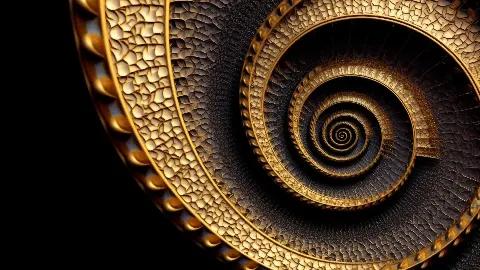
4K TV Art in Gold
The Golden Spiral
Black and Gold Wall Art
from €9.99
GUIDES · FRAME TV
The Frame turns a television into a picture when it is switched off, and what it shows matters as much as the screen. Here is how to choose landscape art, which files to use and how to load them.
Samsung's The Frame is a television designed to look like a framed picture. When you are not watching, Art Mode shows a still image at low brightness, and the slim bezel and optional digital mat make it read as artwork rather than a screen. Art for Samsung Frame TV has to work within that shape: a wide 16:9 landscape, seen from across a room, often in daylight.
Pictures made for paper do not always survive the move. A tall portrait painting placed on a landscape screen ends up with wide empty bands at the sides or a heavy crop. Images composed for 16:9 from the start fill the screen naturally, with the subject where the eye expects it. That is why the works here were designed as wide panels rather than cut down from tall ones.
Most Frame models have a 4K panel of 3840 × 2160 pixels, so a file of exactly that size shows the most detail with no scaling. Each work here comes as a 4K TV pack: the 3840 × 2160 file plus QHD (2560 × 1440) and Full HD (1920 × 1080) versions. The smaller files suit smaller or older Full HD screens and other displays, and they load quickly on any device.
Use the file that matches your screen rather than a larger one; the television would scale a bigger image down anyway, and an exact match keeps fine lines crisp. The Golden Spiral shows why that matters. Its single coil is built from small gold tiles worked like beaten metal, with a beaded rim catching the side light in a line of bright points, detail that softens when an image is resized more than it needs to be.

The usual route is the SmartThings app on your phone. Connect the app to your television, open its Art Mode section and add images from your phone's photo library; they then appear in your own collection on the TV. You can choose a mat style and colour, a digital border that imitates a mount, or show the picture full screen.
The other route is a USB stick. Save the JPEG files onto it, plug it into the television or its connection box, and import the images into Art Mode from the on-screen menu. Menus differ a little between model years, so if an option is not where you expect it, look in the Art Mode settings. No subscription is needed to display your own art for Samsung Frame TV.
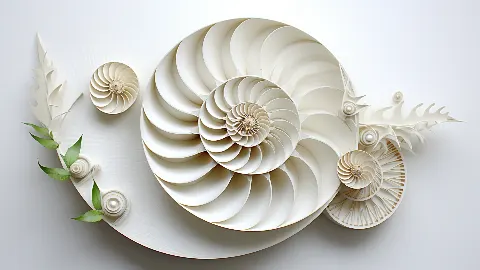
The Frame adjusts its brightness to the room with an ambient light sensor, but the picture still sets the tone. Dark grounds look most like paintings in the evening and in rooms with dark walls, where a black screen edge disappears. The Golden Spiral, gold on a completely dark ground, almost seems to project from the wall at night. Light works suit bright rooms and pale bezels: The Paper Nautilus is nearly all white, a nautilus of layered paper among paper shells and leaves, with one green sprig as its only colour.
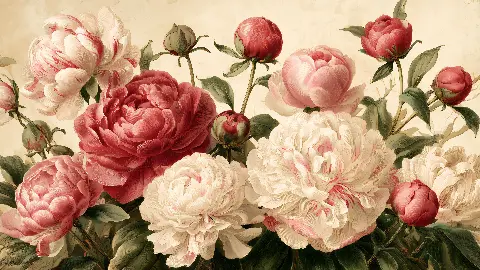
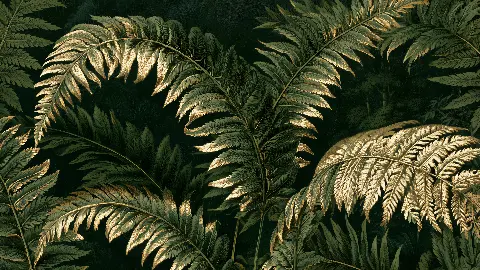
Bezels can be swapped, so think about the frame as you would for a print. A teak or walnut bezel warms up botanical works, white suits pale Scandinavian rooms, and black is the most neutral. Peony Garden in Gold, with pink, crimson and cream peonies along the bottom of a wide, open cream panel, looks gentle in a white or wood bezel. Fern Forest in Gold, densely layered green and gold fronds on dark forest green, suits a dark bezel and a calm, green-toned room.
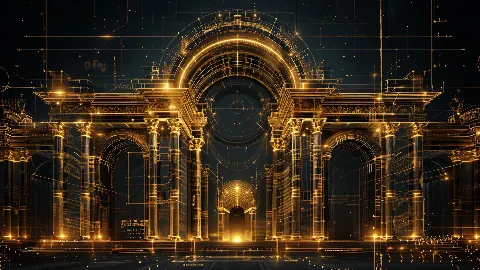
Wide art for Samsung Frame TV needs something to carry the eye across it. The Golden Tree of Life does it with branches curling outward from a dark central trunk, each ending in a tight spiral, on a gold ground dotted with small coloured circles. The Golden Arcade uses symmetry instead: three tall arches between paired columns, drawn as a gold blueprint on black, with a lit doorway at the centre pulling the eye to the middle.
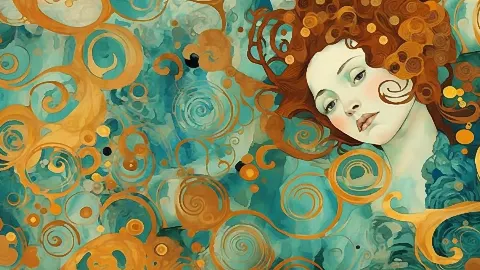
Others rely on colour. The Teal Muse places a pale face among gold and copper spirals on teal and turquoise, her copper curls merging with the pattern, so the screen becomes a field of ornament in the spirit of Klimt. Hummingbirds at Dusk sets two turquoise and amber birds face to face in mid-air against a deep teal sky, with orange blossoms reaching up from the lower left. Both read clearly from the sofa, which is where most people see a television.
Part of the pleasure of a screen is that the picture can change. Art Mode can run a slideshow of your collection, moving on at an interval you set, or you can switch pictures by hand with the seasons: greens and florals in spring and summer, gold and dark grounds in autumn and winter. Three or four works that share a palette make a calmer rotation than a random mix.
The landscape works here also include a print file, so a favourite from the screen can hang on paper in another room. And if you prefer portrait pictures, each portrait download on the site includes a Frame TV version as well, which makes it easy to keep the same art for Samsung Frame TV and for the walls around it.
Eight wide landscape works, each delivered as a 4K TV pack with 3840 × 2160, QHD and Full HD files.

Most Frame models use a 4K panel, so 3840 × 2160 pixels is the ideal size: it fills the screen with no scaling. The 4K TV pack also includes QHD and Full HD versions for smaller or older screens and for other displays.
Use the SmartThings app on your phone: connect it to the TV, open the Art Mode section and add images from your photo library. Alternatively, put JPEG files onto a USB stick, plug it in and import the images through the Art Mode menu.
No. A subscription only unlocks the catalogue of images that Samsung offers itself. Your own files, such as the images in a downloaded 4K TV pack, can be uploaded and displayed in Art Mode without one.
A tall picture on a wide screen leaves large empty areas at the sides or needs a heavy crop. Landscape works composed for 16:9 fill the screen properly, and portrait downloads on the site each include a Frame TV version for exactly this use.
Tell me the room and what you want it to feel like. I will send three works that fit, and a mock-up of each one in place.
Write to meThis site uses cookies for Google Analytics and Google Ads so I can see which pages and ads bring visitors. Nothing is sold or shared beyond that. Privacy